





Scrap Kit by Rebellious Scraps
you can grab it here at
its called
Angel's Of Heaven
ty for letting use it :o)
font of your choice
Tube of your choice
I'm using the amazing
keith Garvey
now lets get started
OPEN PSP NEW IMAGE 600X600 FLOOD FILL WHITE
open the blue paper
paste it on to the new image you just open
and Bev's Mask # 7
now go to up layers down to
new mask layer
from image find bev's mask
press ok merge group
now..
now open WSL Frame press
CTRL+D close hers
now lets add the paper to the frame
from Sandrine's Kit
on the gold paper I drawed out an circle
then I use the selection tool to
on circle
cut and paste under the frame but above the
mask layer
now lets another paper to square frames
I do mine by going to
Materials-background-foreground-patterns-find your papers
now using your floodfilling tool lets flood fill the square frames
on its own layer
now lets add your tube
I used the close up version of the tube
take your eraser tool and erase anything
thats hanging under the frame
now copy her and mirror it
then move it down and under
now back on the 1st one
lower the opacity to 74% on the botton tube
70% on the top
now lets add some elements
I add the dove flying
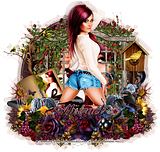
the haloing in his feet see my tag
add the emb. on both sides of the tag
now add your copyrights and name
if your not going to add the heart
save as an png
and ty for doing my tut
for the rest lets go AS
open up the Heart animation from the supplies
it has 21 frames
now go to back to PSP
copy merge and take it to
paste as an new animation
so you need to dulipcate your tag until
it has 21 frames to
heart animation
press
CTRL+A+C
back to the tag press
CTRL+A+E
now right click it
if your happy save as an gif
if not then change the frame prop. by
right clicking again and
going up to frame prop.
remember lower is high and high is low in AS
ty for trying my tuts I would love to see wht you do
hugs
Jenny



























No comments:
Post a Comment